Last Updated on March 6, 2026 by TrendingTechPK
Quick View

The Ultimate Guide: Best SSD for iPhone 15, 16 & 17 Pro Max (2026 Edition)
If you are shooting 4K ProRes Log video on an iPhone 15 Pro, 16 Pro, or gearing up for the iPhone 17 Pro Max, you know the struggle: internal storage disappears instantly. A single minute of 4K ProRes footage can eat up to 6GB of space.
The solution isn’t deleting your apps—it’s grabbing a high-speed external hard drive or SSD. But not just any drive will do. To record directly to an external hard drive, you need specific write speeds (sustained 220MB/s+) and power efficiency.
We’ve curated the top options available in the US market, comparing the latest Best SSD for iPhone, From Lexar 1tb ssd, SanDisk Creator Phone SSD, and the powerhouse Crucial X10 Pro.
Browse the latest tech accessories on TrendingTechPK, and check our Discounts & Deals page for updated offers and promo codes.
Disclosure: We are reader-supported. When you buy through links on our site, we may earn an affiliate commission at no extra cost to you. This helps us test more tech
Quick Comparison: Top 6 External SSDs for iPhone
| Product | Best For | Max Speed | Connection | Special Feature |
| ORICO Magnetic Enclosure | DIY Enthusiasts | 10Gbps | USB-C | 8-in-1 Hub + Power Passthrough |
| Lexar SL500 Magnetic | MagSafe Users | 2000MB/s | USB-C | Magnetic Attachment |
| Lexar Professional Go | Filmmakers | 1050MB/s | USB-C | Hub System + Wireless Mic support |
| SanDisk Creator SSD | Reliability | 2000MB/s | USB-C | Rugged + Clip/Magnet |
| Crucial X10 Pro | Speed Freaks | 2100MB/s | USB-C | Tiny & Water Resistant |
| Crucial X9 | Budget Value | 1050MB/s | USB-C | Best Price-to-Performance |
Detailed Product Reviews
1. ORICO Magnetic M.2 Enclosure with 8-in-1 Hub
Best For: Content creators who need power delivery and extra ports.
The ORICO Magnetic Enclosure is a unique hybrid device. It is not just a storage device; it is a DIY enclosure that allows you to slot in your own M.2 2230 NVMe SSD (sold separately) combined with a powerful docking station.
For iPhone videographers, the standout feature is the 100W PD (Power Delivery) pass-through. Recording to an SSD drains the iPhone battery fast. This hub lets you plug in a charger to keep your phone at 100% while simultaneously recording to the drive. It also includes HDMI (4K 60Hz), SD/TF card slots, and audio jacks, effectively turning your iPhone 17 Pro Max into a mini workstation.
Pros:
- Power Delivery: Charge your iPhone while recording.
- Versatility: Includes HDMI, Audio, and SD card reader.
- Magnetic: Sticks to the back of the iPhone (MagSafe compatible).
Cons:
- DIY Required: You must buy and install the M.2 SSD separately.
- Bulkier: Larger than a standard standalone SSD due to the hub ports.
Ideal Use Case: Long podcast recording sessions or studio shoots where you need continuous power and audio monitoring.
🛒 Buy Now:
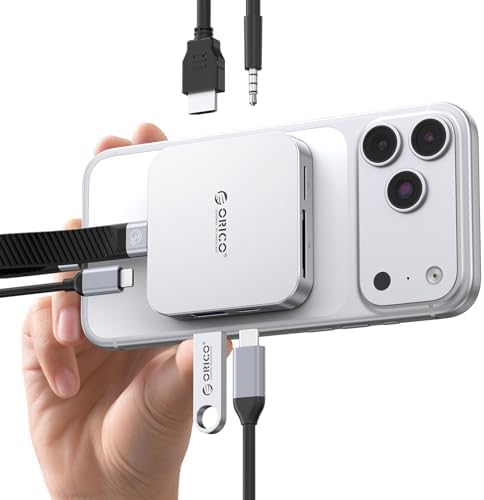
- ORICO 8-Port m.2 docking station: Combines m.2 2230 nvme enclosure + usb c hub with 8 ports (4K@60Hz HDMI, 10Gbps USB-C/…
- MagSafe Magnetic USB hub: Strong magnets ensure secure, slip-free attachment for one-handed use. Included magnetic ring …
- Instant ProRes Video Saving: This versatile USB-C hub lets you directly save 4K ProRes footage from iPhone 17/16/15 Pro/…
2. Lexar SL500 Magnetic Portable SSD
Best For: Run-and-gun vloggers seeking a sleek, cable-free feel.
The Lexar SL500 is designed specifically to solve the dangling cable problem. This Lexar SSD for iPhone features a built-in magnetic mount that snaps securely onto the back of your iPhone As external ssd For iPhone 17 Pro Max.
It boasts blistering speeds up to 2000MB/s (Read) and 1800MB/s (Write). While the iPhone’s USB-C port caps at 10Gbps (approx 1000MB/s), the extra overhead ensures the drive never bottlenecks during heavy 4K 60fps ProRes recording. Its slim profile means you can slip the phone into your pocket without detaching the drive.
Pros:
- Ultra-Slim: Credit card size and very thin.
- Secure Fit: Strong magnetic hold for MagSafe iPhones.
- High Performance: Exceeds Apple’s requirements for ProRes.
Cons:
- Heat: Can get warm during extended 4K recording sessions.
- Cable: You still need a short USB-C cable (included) to connect data.
Ideal Use Case: Street photography and travel vlogging where a bulky rig is impractical.
🛒 Buy Now:
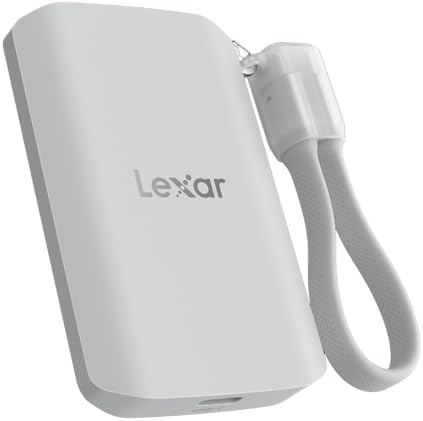
- Up to 2000MB/s read and 2000MB/s write to transfer files fast for a smooth workflow (Performance on Mac and other system…
- The drive’s MagSafe-compatible design makes it easy to attach to your compatible smartphone. An additional metal ring ac…
- Supports recording in Apple ProRes at 4K120FPS, and Samsung Pro Video 8K 30FPS
3. Lexar Professional Go Portable SSD with Hub
Best For: Professional mobile filmmakers using rigs.
The Lexar Professional Go is a massive leap forward for mobile cinema. This isn’t just a drive; it’s a modular system. It allows you to plug the drive directly into the phone’s port (no cables dangling) or use the included hub to add lighting and microphones.
Targeting the search for Lexar 1tb ssd for creators, this unit is incredibly compact. It sits flush against the phone or rig. The ability to daisy-chain accessories makes it the best SSD for iPhone filmmakers who use wireless mics (like DJI Mic or Rode) alongside their storage.
Pros:
- Cable-Free Option: Can plug directly into the USB-C port.
- Modular Hub: Great for attaching accessories.
- IP65 Rated: Dust and water resistance for outdoor shoots.
Cons:
- Price: Premium pricing for the modular features.
- Size: The tiny form factor makes it easy to lose if not stored carefully.
Ideal Use Case: Documentary filmmaking on iPhone where audio and storage must work simultaneously.
🛒 Buy Now:

- Ultra-compact so you can always keep it with you for spontaneous creativity anytime, anywhere
- Wireless plug-and-play Type-C connector frees you from tangled, cumbersome cables (press firmly to ensure drive is compl…
- Capture brilliant Apple ProRes footage and store with ease
4. SanDisk Desk/Mobile Drive (Creator Phone Series)
Best For: Adventure travelers needing rugged durability.
SanDisk is a household name, and the SanDisk Creator Phone SSD (SDSSDE62C) is built to survive. Known for their Extreme series, this new iteration is optimized for the mobile workflow.
It offers read speeds up to 2000 MB/s and features a tough rubberized exterior that can withstand drops up to 3 meters. If you are searching for a SanDisk SSD that can survive a hike or a drop on concrete while connected to your iPhone 17 Pro Max, this is it. It connects easily via USB-C and is universally recognized by iOS Files app instantly.
Pros:
- Durability: Drop protection and IP55 water/dust resistance.
- Brand Trust: Reliable controller and flash memory.
- Carabiner Loop: Easy to clip onto backpacks or belt loops.
Cons:
- Size: Slightly bulkier than the Crucial or Lexar options.
- No Magnet: Requires a separate clamp or adhesive to stick to the phone.
Ideal Use Case: Outdoor adventures, hiking vlogs, and action sports filming.
🛒 Buy Now:
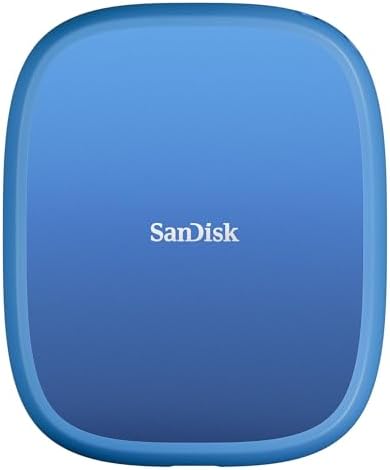
- INCREDIBLE SPEED – Experience rapid file transfers with up to 1000MB/s read and 950MB/s write speeds, thanks to the adva…
- EXPANSIVE STORAGE – Choose between 1TB and 2TB capacities, providing ample space for high-resolution photos, videos, and…
- UNIVERSAL COMPATIBILITY – Seamlessly works with Windows 10+, macOS 14+, iOS/iPadOS 17+, and Android 14+, offering versat…
5. Crucial X10 Pro Portable SSD
Best For: Editors who need speed when transferring to a Mac/PC.
The Crucial X10 Pro is a tiny giant. It is one of the smallest 2TB/4TB drives on the market, yet it packs USB 3.2 Gen 2×2 speeds (up to 2100MB/s).
While the iPhone will only utilize half that speed (due to its 10Gbps limit), the X10 Pro shines when you get home. Plugging this into your MacBook or PC allows for lightning-fast offloading of your footage. If you are looking for an external ssd For iPhone 17 Pro Max that is future-proof and edits straight off the drive on your computer, the X10 Pro is the winner.
Pros:
- Form Factor: Extremely small (fits in a coin pocket).
- Edit-Ready: Fast enough to edit footage directly from the drive on a laptop.
- Build: Anodized aluminum with a soft-touch base.
Cons:
- Overkill for Phone: iPhone cannot utilize the full Pro speeds yet.
- Price: More expensive than the X9.
Ideal Use Case: Hybrid creators who shoot on iPhone but edit heavily on high-end laptops.
🛒 Buy Now:

- Ultra-fast Speeds: Designed for creators, students and PC gamers, this matte blue external SSD delivers fast data access…
- Built to Last: Perfect for travel and all types of weather with IP65 dust and water resistance. Plus, it’s drop resistan…
- Broad Compatibility: External drive connects effortlessly with Windows, Mac, iPad Pro, Chromebooks, Android, Linux, PS4,…
6. Crucial X9 Portable SSD
Best For: Budget-conscious shoppers and students.
You don’t need to break the bank to get reliable storage. The Crucial X9 is widely considered the best value external hard drive for mobile users. It offers speeds up to 1050MB/s, which matches the iPhone 15/16 Pro’s USB-C port limit perfectly.
You aren’t paying for extra speed you can’t use on the phone. It is lightweight, durable (drop-proof up to 7.5ft), and incredibly reliable. For the keyword Crucial X9, this is the most sensible purchase for the average user who just wants to back up photos or record occasional 4K video.
Pros:
- Price: Excellent value per gigabyte.
- Compatibility: Works perfectly with iPhone 15/16 USB-C speeds.
- Design: Simple, clean, and durable.
Cons:
- Speed: Slower offload speeds to computer compared to X10 Pro.
- No Encryption: The standard X9 lacks the hardware encryption of the Pro version.
Ideal Use Case: Backing up photo libraries and casual 4K video recording.
🛒 Buy Now:

- High-speed Performance: Designed for casual gamers and everyday use, this external SSD with up to 1050MB/s accelerates l…
- Built to Last: Perfect for travel and all types of weather with IP55 water and dust resistance. Plus, it’s drop resistan…
- Broad Compatibility: External drive connects effortlessly with Windows, Mac, iPad Pro, Chromebooks, Android, Linux, PS4,…
Shopping Guide: How to Choose an SSD for iPhone ?
When shopping for storage for your iPhone external hard drive in 2026, consider these three critical factors:
- Sustained Write Speed: To record Apple ProRes 4K at 60fps, your drive must support sustained write speeds of at least 220 MB/s. All drives listed above meet this standard. Standard flash drives usually do not.
- Power Consumption: The iPhone powers the drive via its USB-C port. Drives like the Crucial X9 and Lexar SL500 are power-efficient. Older, spinning mechanical hard drives (HDD) require too much power and will not work without an external power source.
- Portability & Mounting: If you are filming handheld, a dangling drive is a nightmare. Look for Magnetic/MagSafe compatible drives (like the Lexar SSD for iPhone or ORICO Enclosure) that stick to the back of the phone.
FAQ: External Storage for iPhone
Which SSD is best for iPhone 15 Pro Max?
For direct mounting, the Lexar SL500 Magnetic is the best choice due to its MagSafe compatibility. For pure value and reliability, the Crucial X9 is the top pick. sandisk ssd Also.
Which SSD is best for iPhone 17 Pro Max?
As the iPhone 17 Pro Max approaches, look for drives with USB 3.2 Gen 2×2 support like the Crucial X10 Pro to future-proof your workflow, ensuring fast transfer speeds to your editing computer. So Our Recomended All external ssd For iPhone 17 Pro Max is Above The Article
How to format SSD for iPhone?
The iPhone requires the SSD to be formatted in exFAT or APFS. exFAT is recommended because it is compatible with both Windows and Mac computers. You can format it using the Disk Utility on a Mac or Disk Management on Windows before plugging it into the phone.
How to format SanDisk SSD for iPhone?
Plug your SanDisk SSD into a computer. If using a Mac, open Disk Utility, select the SanDisk drive, click Erase, and select exFAT as the format. Once done, plug it into your iPhone, and it will appear in the Files app.
How to use SSD for iPhone?
Simply connect the external ssd For iPhone 17 Pro Max to the iPhone’s USB-C port using a high-speed (10Gbps) cable. Open the Files app to manage data. To record video directly to it, go to Settings > Camera > Formats > turn on Apple ProRes, and connect the drive. The camera app will show USB-C near the time counter.
Conclusion
Upgrading your storage is the smartest investment for your mobile filmmaking kit. For seamless integration, we recommend the Best external ssd For iPhone 17 Pro Max is Lexar SL500 Magnetic. If you need a robust workstation setup, the ORICO Enclosure with Hub is unbeatable. For pure speed and reliability, grab the Crucial X10 Pro.
Ready to upgrade your gear? Click the buttons above to secure the best deals on Amazon today and start capturing unlimited 4K footage.